
Setting the humidity limit
The humidity limit means the relative humidity content of air that triggers boosted ventilation when exceeded.
The humidity level must only be set if manual humidity control adjustment is enabled.
When the humidity control is set to Automatic, the unit determines the base level automatically. This mode is ideal for regular household ventilation, and the user does not have to set the humidity level separately. If the screen says Calibrating, the unit is in the middle of determining the normal humidity level.
When the humidity control is set to Manual, the user must set the humidity limit between 1 and 99%RH. Usually, the suitable humidity level for a normal living environment is around 40–60%RH. A higher humidity limit (e.g. over 70%RH) is suitable for spaces with a naturally high humidity level, such as indoor pool facilities or humid work environments.
To set the humidity limit:
- Select Settings.

- Select Expert settings with the arrow buttons.
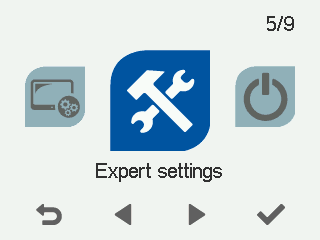
- Select OK.

- Select Control settings with the arrow buttons.
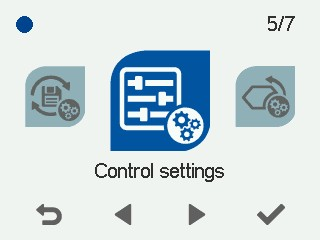
- Select OK.
- Select Right arrow two times.
The Control settings screen opens:
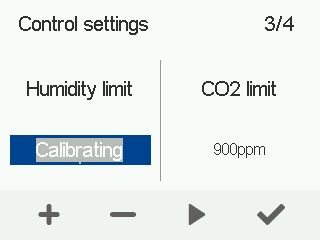
- Use the Plus and Minus buttons to set the humidity level as a percentage.
- Select OK.