
Humidity control (Automatic / Manual)
The humidity control method determines how the ventilation unit reacts to the humidity level of indoor air. The unit’s integrated humidity sensor is located in the extract air chamber. The unit can also be connected to an external humidity sensor (optional) installed in the apartment.
The humidity control boosts the fan speed to the speed set for the Boost mode. If the Boost mode is activated, the speed can be increased to the maximum fan speed. In any case, the humidity control does not reduce the fan speed below the level set for the active ventilation mode (e.g. At Home, Away). The humidity control can be disabled from the ventilation mode settings.
- Select Settings.

- Select Expert settings with the arrow buttons.
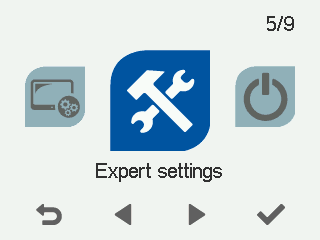
- Select OK.

- Select Control settings with the arrow buttons.
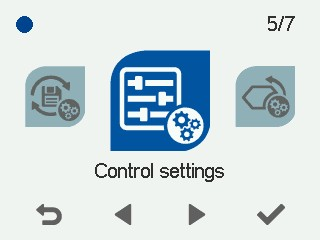
- Select OK.
- Select Right arrow.
The Control settings screen opens:
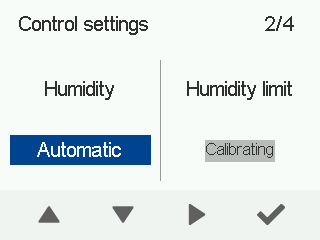
- Use the arrow buttons to select the humidity control adjustment method.
The options are:
- Automatic (factory setting) — Use the Automatic setting for regular apartment ventilation. If automatic humidity control is in use, the unit determines the normal humidity level and records it. The unit strives to restore this humidity level after a shower, for example. The normal humidity level changes automatically seasonally. If you are using the Automatic setting, you do not have to manually adjust the humidity limit.NOTE:Automatic humidity control is selected during unit setup. It takes 3–10 hours to determine the relative humidity level. The humidity level cannot be adjusted during this period.
- Manual — Use the Manual setting in places, where the humidity level of indoor air stays constant around the year. For example, this setting is recommended for use in indoor swimming pools. You can set the humidity level between 1–99%RH. The unit strives to maintain this humidity level. If you are using the Manual setting, remember to set the humidity limit.
For more information about setting the humidity limit, see section Setting the humidity limit.
- Automatic (factory setting) — Use the Automatic setting for regular apartment ventilation. If automatic humidity control is in use, the unit determines the normal humidity level and records it. The unit strives to restore this humidity level after a shower, for example. The normal humidity level changes automatically seasonally. If you are using the Automatic setting, you do not have to manually adjust the humidity limit.
- Select OK.