
Browsing the Away mode information
To browse the basic Away mode information of the Vallox MV ventilation unit:
- Press the Change mode button
 until the icon of the Away mode appears on the display:
- Please wait until the main view of the Away mode opens:
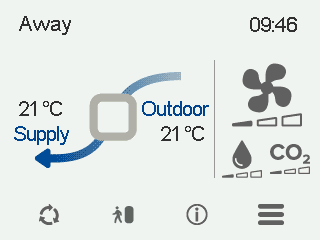
The main view shows a summary of the mode information.
- Select Away information:

The first mode information screen opens:
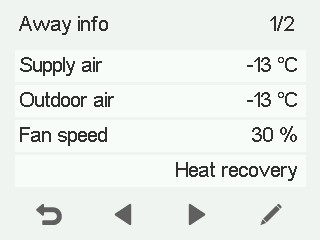
This screen shows the following information:
- Supply air — Indicates the actual temperature of the air flowing into the apartment and the supply air temperature setting (in parentheses) if the supply air is warmer than the value set.
- Outdoor air — Indicates the outdoor temperature.
- Fan speed — Indicates the fan speed. If the automatic fan speed boost is active, the set value is shown in brackets, followed by the real fan speed.
- Cell status — The ventilation unit has the following HR cell modes:
- Heat recovery — The HR cell heats the air flowing in from outdoors with extract air.
- Cold recovery — The HR cell cools the air flowing in from outdoors with extract air when the temperature of the air that is extracted from the apartment is two degrees lower than the outdoor temperature.
- Bypass — The inflowing air bypasses the HR cell.
- HR cell defrost in progress — The HR cell is being defrosted.
- Select Right arrow. The second mode information screen opens:
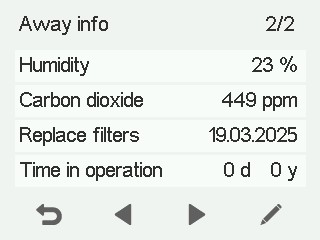
This screen shows the following information:
- Humidity — Indicates the highest relative humidity value measured by the sensors.
- Carbon dioxide — Indicates the highest carbon dioxide value measured by the sensors.
- Replace filters — Indicates the next recommended filter replacement date.
- Time in operation — Indicates for how long the unit has been running.