
Browsing the Custom mode information
To browse the basic Custom mode information of the Vallox MV ventilation unit:
- Press the Change mode button
 until the icon of the Custom mode appears on the display:
- Please wait until the main view of the Custom mode opens:
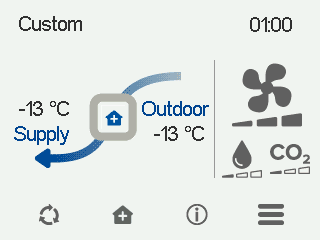
The main view shows a summary of the mode information.
- Select Custom information:

The first mode information screen opens:
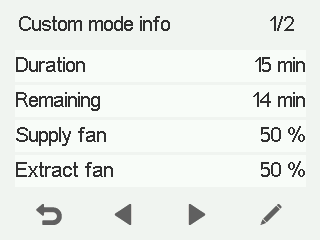
This screen shows the following information:
-
Duration — Indicates the duration of the Custom mode, when the Custom mode is activated. The duration is given in hours and minutes.
-
Remaining — Indicates how much time is remaining in the Custom mode.
-
Supply air fan speed — Indicates the speed of the supply air fan as a percentage of the maximum speed.
-
Extract air fan speed — Indicates the speed of the extract air fan as a percentage of the maximum speed.
-