
Viewing the At Home mode information
To view the basic information of the At Home mode:
- Press the Change mode button
 until the icon of the At Home mode appears on the display:
- Please wait until the main view of the At Home mode opens:
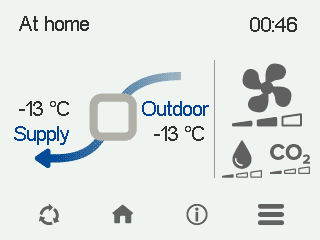
The main view shows a summary of the mode information.
- Select At Home information:

- The first mode information screen opens:
Figure 1. At Home information CFi/MV 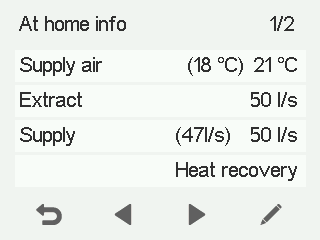
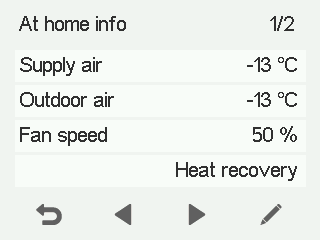
This screen shows the following information:
- Supply air — Shows the temperature of the air blown into the building and its set value (in brackets), if the supply air is warmer than the set value.
- Extract (CFi)— Shows the current extract air flow (l/s or m3/h). The extract air flow setting is determined automatically based on the supply air flow, and the user cannot adjust it.
- Supply (CFi) — Shows the current supply air flow (l/s or m3/h). If the air flow differs from the set value, the set value is shown in brackets. This can happen, for example, when the ventilation unit has automatically boosted the air flow.
- Outdoor air (MV) — Shows the outdoor temperature.
- Fan speed (MV) — Shows the fan speed. If the automatic fan speed boost is active, the set value is shown in brackets, followed by the real fan speed.
- HR cell status:
- Heat recovery —Heat from extract air is used to heat the outdoor air flowing in.
- Cold recovery — Extract air cools the incoming outdoor air when it is at least two degrees cooler than the outdoor air.
- Bypass — Outdoor air bypasses the HR cell either partially or completely.
- HR cell defrost in progress — The HR cell is being defrosted.
- Select Right arrow. The second mode information screen opens:
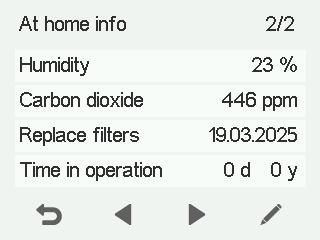
This screen shows the following information:
- Humidity —Shows the highest relative humidity value measured by the ventilation unit.
- Carbon dioxide — Shows the highest carbon dioxide value measured by the ventilation unit.
- Replace filters — Shows the next recommended filter replacement date.
- Time in operation — Shows how long the unit has been running.