
Viewing the Automatic mode information
Automatic mode adjusts ventilation based on the information from humidity and carbon dioxide sensors. Humidity and carbon dioxide controls are always in operation, and the fan speed is adjusted automatically as needed.
In the Automatic mode, the default speed is the Away mode's fan speed and the temperature is the At Home mode's temperature setting.
The automatic mode is designed for continuous use and for maintaining good indoor air quality without separate adjustments.
To view the basic information of the Automatic mode:
- Press the Change mode button
 until the icon of the Automatic mode appears on the display:
- Please wait until the main view of the Automatic mode opens:
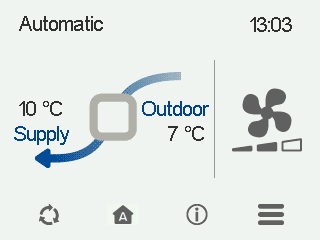
The main view shows a summary of the mode information.
- Select Automatic information:

The first mode information screen opens.
This screen shows the following information:
- Supply air — Shows the temperature of the air blown into the building and its set value (in brackets), if the supply air is warmer than the set value.
- Extract (CFi)— Shows the current extract air flow (l/s or m3/h). The extract air flow setting is determined automatically based on the supply air flow, and the user cannot adjust it.
- Supply (CFi) — Shows the current supply air flow (l/s or m3/h). If the air flow differs from the set value, the set value is shown in brackets. This can happen, for example, when the ventilation unit has automatically boosted the air flow.
- Outdoor air (MV) — Shows the outdoor temperature.
- Fan speed (MV) — Shows the fan speed. If the automatic fan speed boost is active, the set value is shown in brackets, followed by the real fan speed.
- HR cell status:
- Heat recovery —Heat from extract air is used to heat the outdoor air flowing in.
- Cold recovery — Extract air cools the incoming outdoor air when it is at least two degrees cooler than the outdoor air.
- Bypass — Outdoor air bypasses the HR cell either partially or completely.
- HR cell defrost in progress — The HR cell is being defrosted.
- Select Right arrow. The second mode information screen opens.
This screen shows the following information:
- Humidity —Shows the highest relative humidity value measured by the ventilation unit.
- Carbon dioxide — Shows the highest carbon dioxide value measured by the ventilation unit.
- Replace filters — Shows the next recommended filter replacement date.
- Time in operation — Shows how long the unit has been running.