
Digital input 1 and 2
To edit the digital input 1 or 2 of the ventilation unit:
- Select Expert settings.
-
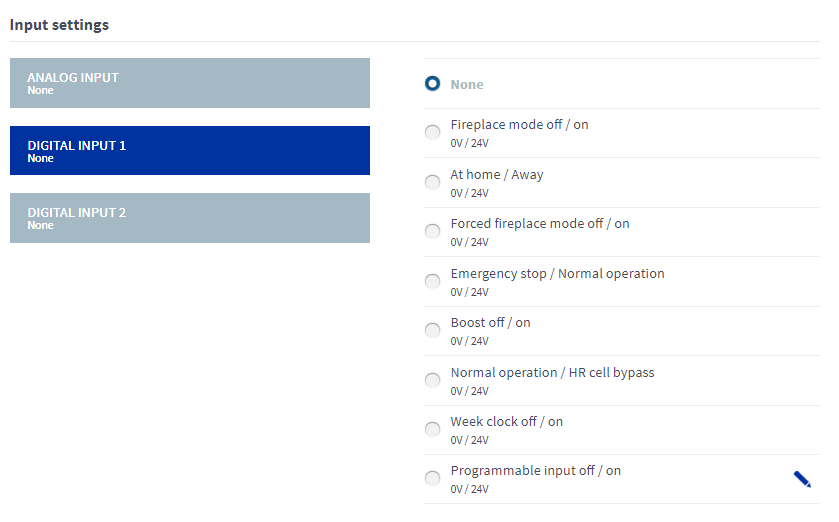
Select Digital input 1 or 2 in the Input settings area.
-
Select the function of the digital input from the list.
The options are:
- None — The input is not enabled.
- Custom mode off / on, 0V / 24V — If you enter 24 V in the digital input, the unit switches to the Custom mode. If you enter 0 V in the digital input, the unit switches back to the previous ventilation mode.
- At Home / Away, 0V / 24V — If you enter 0 V in the digital input, the unit switches to the At Home mode. If you enter 24 V in the digital input, the unit switches to the Away mode.
- Forced Custom mode off / on, 0V / 24V — If you enter 24 V in the digital input, the unit switches to the Custom mode. If you enter 0 V in the digital input, the unit switches back to the previous ventilation mode.
- Emergency stop / Normal operation, 0V / 24V — If you enter 0 V in the digital input, the unit applies the emergency stop. If you enter 24 V in the digital input, the unit switches back to the previous ventilation mode.
- Boost off / on, 0V / 24V — If you enter 24 V in the digital input, the Boost mode is activated for the duration of the timer. If you enter 0 V in the digital input, the unit switches back to the previous ventilation mode.
- Normal operation / Heat recovery cell bypass, 0V / 24V — If you enter 0 V in the digital input, the unit switches to the automatic mode. If you enter 24 V in the digital input, the unit switches to the bypass mode.
- Week clock off / on, 0V / 24V — If you enter 24 V in the digital input, the week clock is activated. If you enter 0 V in the digital input, the week clock is deactivated.
- Programmable input off/on, 0V / 24V — If you enter 24 V in the programmable input, the programmable input is activated. If you enter 0 V in the programmable input, the programmable input is deactivated. See Programmable input.