
Adjusting the supply and extract air flows
This section describes how to set the supply and extract air flows, i.e. the output ratio between the supply and extract air fans.
Adjust the air flows according to the ventilation plan. First, set the valves to the correct adjustment positions. Next, set the fans as close to the optimal value as possible by consulting the fan diagram. You can use the gauge fittings connected to the unit or delivered with the unit when adjusting the total air flow of the system. Then, measure and adjust the air flows from the valves. Try to adjust the air flows without choking them with the valves. This makes the solution as quiet and energy-efficient as possible.
If the output ratio between the air flows is very high at first, the ventilation unit may have to carry out extra defrosting cycles in sub-zero temperatures, thus making adjustment of the air flows more complicated.
The supply and extract air settings have been completed by a specialist during the setup of the Vallox ventilation unit. If you edit the settings, ensure that they comply with the ventilation plan.
If the outdoor air is very cold (aluminium or enthalpy unit: below -10°C; plastic unit: under -3°C), the ventilation unit may have to defrost the HR cell. In that case, the air flows cannot be adjusted.
The system indicates if the unit starts to defrost the HR cell during guided setup. Wait until the defrosting is over.
When you want to adjust the supply and extract air flows:
- Select Expert settings.
- Scroll the display until you see the Basic fan settings and ventilation modes area.
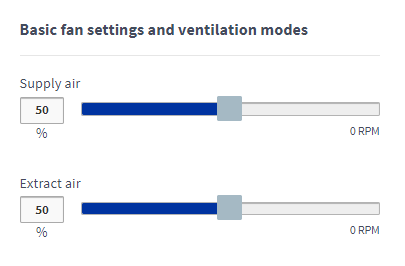
- Set the supply air fan speed as a percentage of the maximum by moving the blue Supply air slider. The fan speed (rpm) will change accordingly.
- Measure and adjust the supply air flows from the valves.
- Set the extract air volume as a percentage of the maximum output by moving the blue Extract air slider. The fan speed (rpm) will change accordingly.
- Measure and adjust the extract air flows from the valves.Supply and extract air flow settings are now complete.
- Record the set percentages in the measurement log.