
Control settings
- Adjustment of the temperature of air flowing into the apartment
-
Adjustment of humidity control
Humidity control refers to a function the ventilation unit uses to control ventilation based on the relative humidity of room air. If more than one humidity sensor is in use, the fan speed is adjusted according to the highest level.
-
Humidity limit
The humidity limit refers to the air’s relative humidity level. If this level is exceeded, the ventilation unit boosts ventilation.
-
Carbon dioxide limit
The carbon dioxide limit refers to the air’s carbon dioxide content. When the limit value is exceeded, the ventilation unit boosts ventilation. If more than one carbon dioxide sensor is in use, the fan speed is adjusted according to the highest level. The carbon dioxide sensor is an optional accessory.
NOTE:The indicative maximum carbon dioxide content of good room air is 900 ppm.
Other limits related to carbon dioxide content:- 1200 ppm — Limit of acceptable indoor air
- 700 ppm — Limit of excellent indoor air
Source: Classification of Indoor Environment 2018
To make sensor-related settings:
- Select Expert settings.
-
Go to the Control settings area.
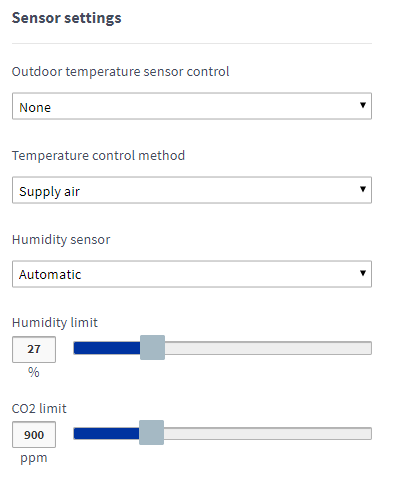
-
Select the method of use of the external temperature sensor from the Outdoor temperature sensor control menu. The options are:
-
Not in use — The duct radiator is located in the outdoor air duct, no external sensor has been connected.
-
Outdoor air duct radiator control — The duct radiator and the external sensor are located in the outdoor air duct.
-
Air heating — Not used in the controlling of the duct radiator.
-
Supply air duct radiator control — The duct radiator and the external sensor are located in the supply air duct.
-
-
Select the method for adjusting the supply air temperature from the Temperature control method menu. The options are:
- Use the Supply air setting to set the target supply air temperature. The ventilation unit strives to maintain this temperature.
- If the air temperature is lower than the target supply air temperature after the air has passed through the HR cell, the ventilation unit activates the post-heating resistor.
- If heating the supply air is not necessary, the HR cell is bypassed.
- Use the Extract air setting to set the target indoor air temperature. The ventilation unit strives to maintain this temperature. The supply air temperature varies according to the indoor air temperature.
- If the extract air temperature is lower than the supply air temperature set for the active ventilation mode, the unit increases the supply air temperature (max. 10°C). If necessary, the unit uses the post-heating resistor.
- If the extract air temperature is higher than the supply air temperature set for the active ventilation mode, the unit reduces the supply air temperature (max. 10°C). If heating the supply air is not necessary, the HR cell is bypassed.
- The Cooling setting works similarly to the Extract air setting, but the ventilation unit boosts the air flows, as necessary.
- Use the Supply air setting to set the target supply air temperature. The ventilation unit strives to maintain this temperature.
-
Select the method for adjusting the humidity control from the Humidity sensor menu. The options are:
- Automatic (factory setting) — Use the Automatic setting for regular apartment ventilation. If automatic humidity control is in use, the unit determines the normal humidity level and records it. The unit strives to restore this humidity level after a shower, for example. The normal humidity level changes automatically seasonally. If you are using the Automatic setting, you do not have to manually adjust the humidity limit.NOTE:Automatic humidity control is selected during unit setup. It takes 3–10 hours to determine the relative humidity level. The humidity level cannot be adjusted during this period.
- Manual — Use the Manual setting in places, where the humidity level of indoor air stays constant around the year. For example, this setting is recommended for use in indoor swimming pools. You can set the humidity level between 1–99%RH. The unit strives to maintain this humidity level. If you are using the Manual setting, remember to set the humidity limit.
- Automatic (factory setting) — Use the Automatic setting for regular apartment ventilation. If automatic humidity control is in use, the unit determines the normal humidity level and records it. The unit strives to restore this humidity level after a shower, for example. The normal humidity level changes automatically seasonally. If you are using the Automatic setting, you do not have to manually adjust the humidity limit.
- If you use the Manual setting, set the humidity level as a percentage by using the blue Humidity limit slider.
- Use the blue CO2 limit slider to set the carbon dioxide limit as parts per million (ppm). The value can be set between 500–2000 ppm. The factory setting is 900 ppm.