
Programmable input
The programmable input compensates for underpressure caused by, for example, the use of a central vacuum system or cooker hood. When the building automation system detects that the appliance has started, it sends a signal to the programmable digital input of the ventilation unit. The ventilation unit then adjusts the air flow according to the set values.
NOTE:
The ventilation unit has two digital inputs (Digital input 1 and Digital input 2). You can select the programmable input to be activated from either digital input, but only one programmable input profile is available, so the settings are the same for both.
To program the input:
- Select Expert settings.
- Select Digital input 1 or 2 in the Input settings area.
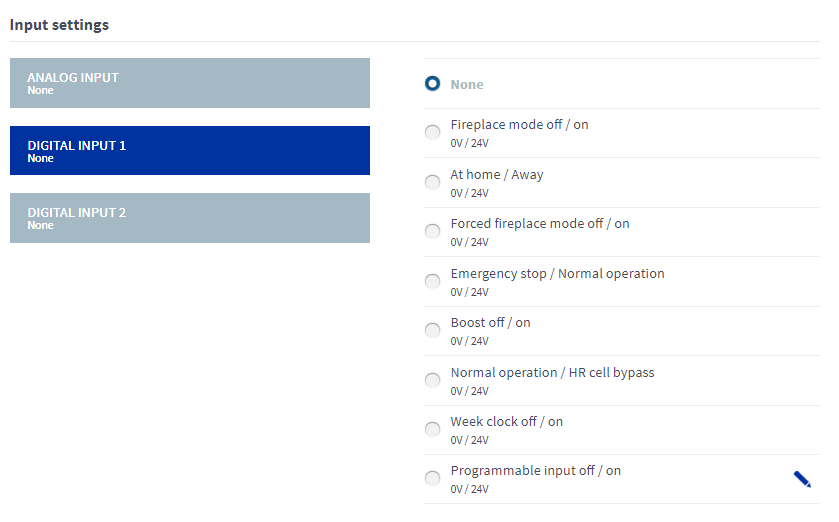
- Select the value Programmable input, 0 V / 24 V for the desired digital input.
- Select the Edit button for the programmable input:

The programmable input will open in editing mode.
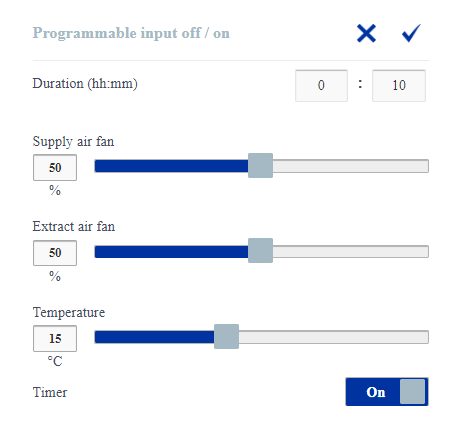
- Set the duration of the programmable input by entering the hours and minutes in the Duration (hh:mm) fields.

- Set the supply air fan output as a percentage of the maximum output using the blue slider.

- Set the extract air fan output as a percentage of the maximum output using the blue slider.

- Set the target supply air temperature for the programmable input. The temperature range is +5°C – +25°C. The factory setting is 15°C.
- Turn the timer on or off by using the On/Off button on the right side of the Timer text.
- When the button says On, the timer is turned on.
- When the button says Off, the timer is turned off.
- When the button says On, the timer is turned on.
- All settings of the programmable input have now been configured.Select OK.
 .
.