
Viewing temperature information
To view temperature and sensor information:
- Select the info button on the main page to open the temperature data.
- A summary of the temperatures and sensors appears:
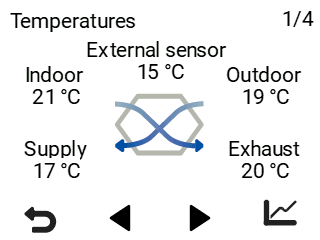
This screen shows the following information:
- Indoor air — Indicates the temperature of air flowing into the unit and extracted from the apartment.
- Outdoor air — Indicates the temperature of air flowing into the unit from outside.
- Supply air — Indicates the temperature of air flowing into the apartment from the unit.
- Exhaust air — Indicates the temperature of air flowing out of the unit.
External sensor — Indicates the temperature of the external sensor. This is shown only when a method of use is selected for the sensor in the expert settings. The value depends on the sensor location selected for the intended use.