
Changing the Custom mode settings
To change the Custom mode settings:
- Press the Change mode button
 until the icon of the Custom mode appears on the display:
- Please wait until the main view of the Custom mode opens:
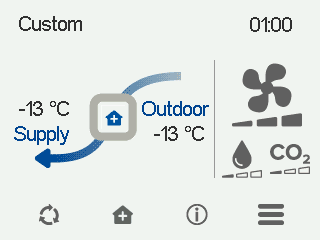
The main view shows a summary of the mode information.
- Select Custom information:

- Select Edit.

The setup screen for the mode timer function opens:
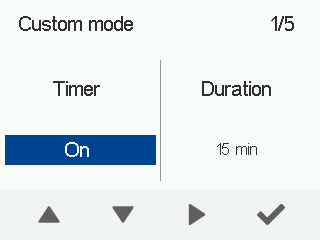
- Use the arrow buttons to turn the timer function on or off. The options are:
- On — When the timer function is on, the selected ventilation mode is active for the period indicated by the timer.
- Off — When the timer function is off, the selected ventilation mode is active until you change the mode (or the week clock changes the mode).
- Select Right arrow.
The screen for setting the Custom mode duration opens.
- Use the Plus and Minus buttons to set the timer in hours and minutes for the mode. This value indicates the duration of boosted ventilation when the Custom mode is activated. The recommended duration is 15–30 min.
- Select Right arrow.
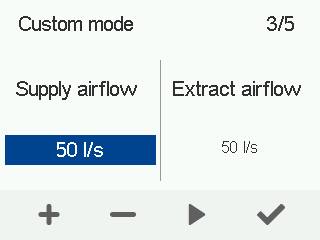
CFi: The supply air flow control screen opens:
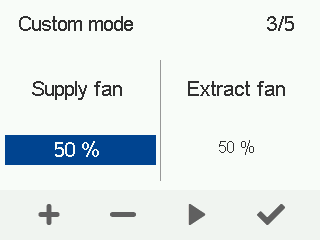
MV: The screen for setting the supply air fan power for the mode opens:
- CFi: Use the Plus and Minus buttons to set the supply air output.
MV: Use the Plus and Minus buttons to set the supply air fan output as a percentage of the maximum output for the Custom mode.
TIP:If you want to create temporary high pressure in the Custom mode, for example when a fireplace is lit or the cooker hood is used, increase the supply air output. Reducing the extract air output is not recommended. - Select Right arrow.
CFi: The extract air flow control screen opens:
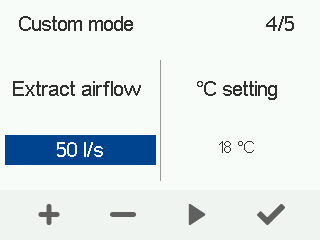
MV: The screen for setting the extract air fan power for the mode opens.
- CFi: Use the Plus and Minus buttons to set the extract air output.
MV: Use the Plus and Minus buttons to set the extract air fan output as a percentage of the maximum output for the Custom mode.
- Use the Plus and Minus buttons to adjust the temperature of supply air. The temperature range is +5°C – +25°C.
The recommended temperature is +18°C, or a couple degrees cooler than the room temperature.
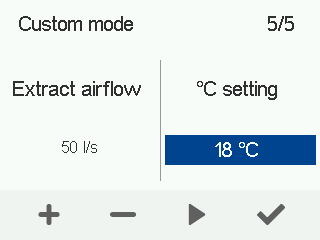
- Select OK.
