
Setting the carbon dioxide limit
The carbon dioxide limit refers to the air’s carbon dioxide content. When the limit value is exceeded, the ventilation unit boosts ventilation. If more than one carbon dioxide sensor is in use, the fan speed is adjusted according to the highest level. The carbon dioxide sensor is an optional accessory.
The indicative maximum carbon dioxide content of good room air is 900 ppm.
- 1200 ppm — Limit of acceptable indoor air
- 700 ppm — Limit of excellent indoor air
Source: Classification of Indoor Environment 2018
The ventilation unit adjusts the fan speed automatically according to the carbon dioxide content of indoor air. The carbon dioxide level can be set between 500 and 2000 ppm, and the factory setting is 800 ppm. This level is suitable for regular household use and ensures a good indoor air quality.
You can set the level higher if, for example, there is a large number of people in the apartment simultaneously and ventilation seems to activate too easily. A lower carbon dioxide level improves the indoor air quality further, as the system reacts quickly to minor increases in carbon dioxide content and activates the ventilation.
The ventilation unit is equipped with a carbon dioxide sensor, which is located in the unit’s extract air chamber. A separate carbon dioxide sensor (optional) can also be installed in the apartment.
The carbon dioxide control boosts the fan speed to the speed set for the Boost mode. If the Boost mode is activated, the fan speed can be increased to the maximum fan speed. In any case, the carbon dioxide control does not reduce the fan speed below the level set for the active ventilation mode (e.g. At Home, Away).
To set the carbon dioxide limit:
- Select Settings.

- Select Expert settings with the arrow buttons.
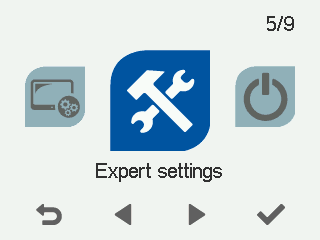
- Select OK.

- Select Control settings with the arrow buttons.
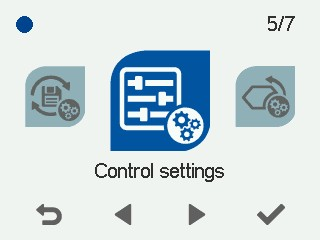
- Select OK.
- Select Right arrow three times.
The Control settings screen opens:
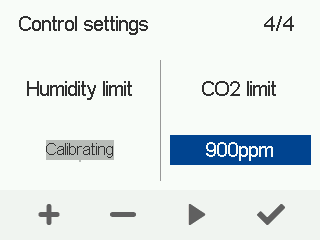
- Use the Plus and Minus buttons to set the carbon dioxide limit in parts per million (ppm). You can set the limit between 500 and 2000 ppm. The factory setting is 900 ppm.
- Select OK.