
Example of setting a weekly program
In this example, the following weekly programme has been set:
Mon–Fri 8–16, you are not. home.
Mon–Fri 17–7, you are home.
Sat 8–17, you are home.
Sat 18–20, you are home and need boosted ventilation e.g. for cooking.
From Sat 21 until Mon 8, you are home.
In the images below, the week clock has been set according to the example:
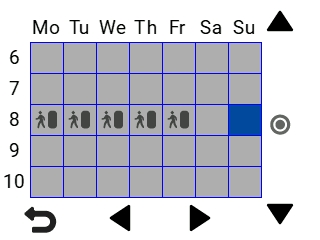
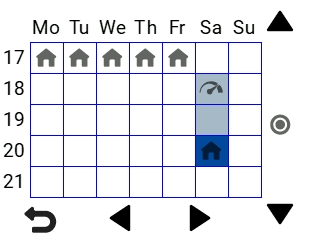
Set the week clock:
- Open the week clock.
- Select Monday, and make the following settings:
- 08:00: select the Away mode.
- 17:00: select the At Home mode.
- Then make the corresponding settings for the other weekdays.
- Then select Saturday, and make the following settings:
- 18:00: set the Boost mode.
- 21:00: set the At Home mode.
- Make sure the week clock is in use. If not, see Turning on the week clock.
The weekly programme has now been set.
Note:
Do not set a ventilation mode separately for every hour. Only include in the weekly programme hours when you want the ventilation mode to change.