
Configuration of relay settings
The relay is used to control devices connected to the duct radiator, such as the pump or solenoid valve. Please note that the relay’s voltage is only 24 V, so a contactor, for example, must be used to control the 230 VAC feed.
- Open Relay settings.
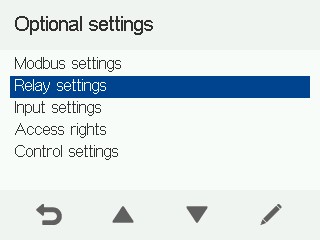
- Select a relay setting.
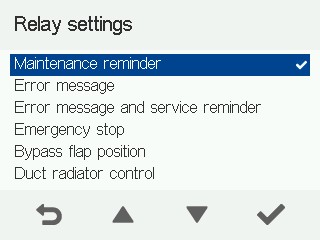
Select Maintenance reminder to notify e.g. the cooker hood or building automation system of the need for filter replacement.
Select Error message to notify e.g. the cooker hood or building automation system of ventilation unit errors.
Select Error message and maintenance reminder to notify e.g. the cooker hood or building automation system of ventilation unit errors and the need for filter replacement.
Select Emergency stop to notify e.g. the cooker hood or building automation system when the emergency stop is activated.
Select Position of the bypass damper to notify the building automation system of the position of the ventilation unit’s bypass damper. The position options are heat recovery or bypass mode.
Select Duct radiator control to control the ventilation unit’s external liquid radiator, e.g. an MLV radiator, with the unit.
Select Air heating to control e.g. a liquid heating radiator in the supply air duct with the ventilation unit.
Select On/off status to notify e.g. the building automation system when the ventilation unit has been turned off or the fans have stopped. The On/off status setting can also be used to control external gate valves.
Select None when the relay function is not in use.
- Configure the relay setting.
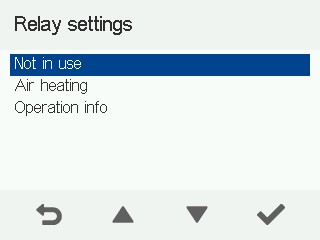
- Proceed with the setup by selecting OK:
