
Mounting the ventilation unit to the ceiling
- Rafters or other framework: Use M8 thread bars that can bear the weight of the unit.
- Make sure the mounting plate is level, because this affects the unit position.
- The top of the white covering strip of the ceiling mounting plate can be fixed against the ceiling. The ceiling mounting plate can also be flush-mounted, in which case the ceiling can be 30 mm lower than the top edge of the white covering strip.
Insulate the channels against condensing water also between the unit and the ceiling mounting plate.
- Fix the thread bars to the rafters or other framework and put nuts around them.
- Lift the ceiling mounting plate in place.
- Push the rubber damper and washer to the bottom of the thread bar plate cups.
- Tighten the nuts so that the ceiling mounting plate is level.
- Shorten the thread bars so that they are no more than 10 mm from the bottom surface of the ceiling mounting plate.Warning:
The ventilation unit is very heavy. Do not perform this procedure alone.
- Install the ceiling mounting plate horizontally with M8 thread bars.
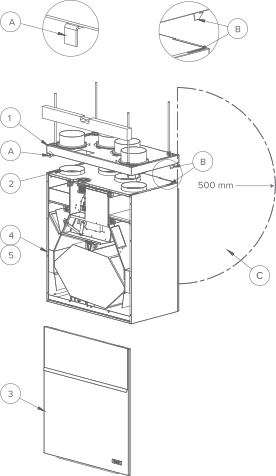 Note:An electrical outlet needs to be within 500 mm of the back right corner of the unit (C).Note:The thread bar head should be no more than 5 mm below the fastening nut. Do not tighten the ceiling mounting plate too tightly against the ceiling. Pull the operating levers (A) to make sure the sliding bars can move and return to their original position. The top of the white covering strip of the ceiling mounting plate can be fixed against the ceiling. The ceiling mounting plate can also be flush-mounted, in which case the ceiling can be 30 mm lower than the top edge of the white covering strip.
 - Check that the insulation washers are attached to the outlet collars below the ceiling mounting plate.
- Remove the ventilation unit door before mounting the unit to the ceiling mounting plate.
- Lift the ventilation unit close to the ceiling mounting plate and pull the cords through the hole in the ceiling mounting plate above the ceiling. Alternatively, the cords can be pulled between the ceiling mounting plate and the ventilation unit to the back wall, as shown in the image here.Note:Remember to make a maintenance hatch in the ceiling to ensure the cords and the connection box are accessible. The maintenance hatch should be approximately 500 mm from the ceiling mounting plate.
When the ventilation unit is lifted against the ceiling mounting plate, the unit is locked in place. (If necessary, guide the ceiling mounting plate’s mounting hooks (B) to the slots on the side panels of the ventilation unit).
There are operating levers (A) for locking in the bottom corners of the front edge of the ceiling mounting plate. When the levers are level with the white covering strip of the ceiling mounting plate, the unit is secured to the ceiling mounting plate.
- If necessary, the unit can be detached from the ceiling mounting plate. Remove the unit door, lift the unit slightly and pull the operating levers (A) of the ceiling mounting plate simultaneously to detach the unit from the ceiling mounting plate.
Attic floor feedthrough plate
The attic floor feedthrough plate (F) is an optional accessory. When using the insulated attic floor feedthrough plate, make sure the vapour barrier is tightly sealed.
The minimum distance between the attic floor feedthrough plate and the back wall is 5 mm. The minimum distance between the attic floorfeedthrough plate and the side panels is 15 mm.