
Setting and editing the weekly programme
To set a week clock programme or edit an existing programme:
- Select Operation menu.
- Click on the desired day and time in the week clock area.The At Home mode is now used for the selected hour:
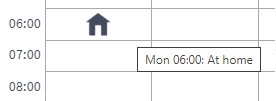
- Click on the selected period to view the ventilation modes. The options are:
- At Home
- Away
- Boost
- Custom
- Finish
-
Empty — If no mode has been selected for the period, the same mode will be used as in the previous period.
- Set any other ventilation mode changes you wish to make for certain periods in the week clock as described above.NOTE:
The mode set for a certain period will be used until the week clock switches to the next programmed mode.
Example
A ventilation mode has been set in the week clock for two periods: the Away mode has been set for 8:00 on Monday and the At Home mode has been set for 16:00 on Friday. In this case, the Away mode will be used from 8:00 on Monday through 16:00 on Friday and the At Home mode from 16:00 on Friday through 8:00 on Monday.
- Ensure that the week clock is turned on (see Turning the week clock on and off).