
Viewing the information of the At Home mode
The At Home mode allows you to view information related to the ventilation unit mode.
- Open Operation menu and select the At Home mode.

- The basic settings of the selected mode will be displayed.
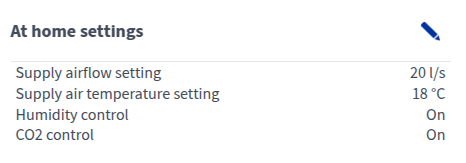
- Supply airflow setting — Shows the supply air flow rate set for the ventilation unit (l/s or m3/h). If automatic boosting (e.g. humidity or carbon dioxide control) is enabled, the actual air flow rate may differ from the set value. The actual supply air flow and extract air flow rates are shown separately under Information.
- Supply air temperature setting — Shows the target supply air temperature set by the user.
- Humidity control — Shows whether humidity boost is enabled.
- CO2 control — Shows whether carbon dioxide boost is enabled.
- More information in the Information area:
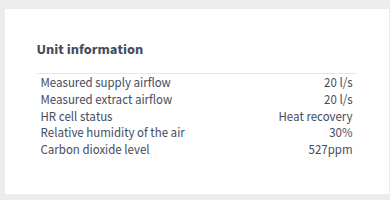
- Measured supply airflow — Shows the current supply air flow (l/s or m3/h). If the air flow differs from the set value, the set value is shown in brackets. This can happen, for example, when the ventilation unit has automatically boosted the air flow.
- Measured extract airflow — Shows the current extract air flow (l/s or m3/h). The extract air flow setting is determined automatically based on the supply air flow, and the user cannot adjust it.
- HR cell status:
- Heat recovery — Heat from extract air is used to heat the outdoor air flowing in.
- Cold recovery — Extract air cools the incoming outdoor air when it is at least two degrees cooler than the outdoor air.
- HR cell bypass — Outdoor air bypasses the HR cell either partially or completely.
- HR cell defrost — The HR cell is being defrosted.
Relative humidity of the air — Shows the highest relative humidity value measured by the ventilation unit.
Carbon dioxide level — Shows the highest carbon dioxide value measured by the ventilation unit.