
Cleaning the heat recovery cell
Warning:
The safety switch automatically turns off the power when the upper door of the Vallox ventilation unit is opened. Always disconnect the Vallox ventilation unit from the mains before starting maintenance.
Check that the heat recovery cell is clean roughly once a year, or whenever the filters are being replaced. Clean by washing as required.
To check and clean the heat recovery cells:
- Disconnect the ventilation unit from the mains electricity supply.
- Lift off the door cover panel. Undo the unit’s mounting screws (4 mm hexagon).
-
Lift the door off.
CAUTION:The door is heavy.
- Turn the upper support of the cell (A) to the upper position (the R model: clockwise; the L model: anti-clockwise).
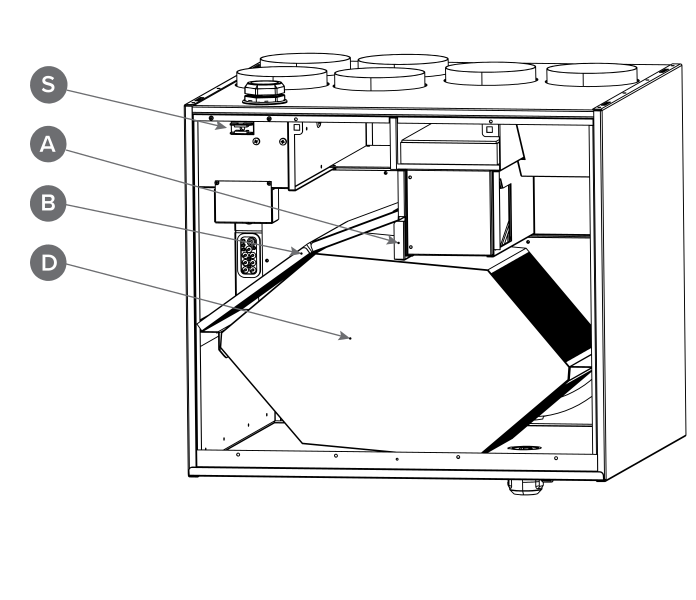
- Remove the extract air filter (B).
- Lift and pull the HR cell (D) out of the unit.
- If the cell is dirty, clean it by immersing it in warm water, to which a small amount of a mild detergent has been added.
- Rinse the cell clean with a water spray. Do not use a high-pressure cleaner.
- When all the water has drained from between the layers, reassemble the ventilation unit as follows:
- Ensure that the lower support (C) is in place against the knobs at the bottom of the unit.
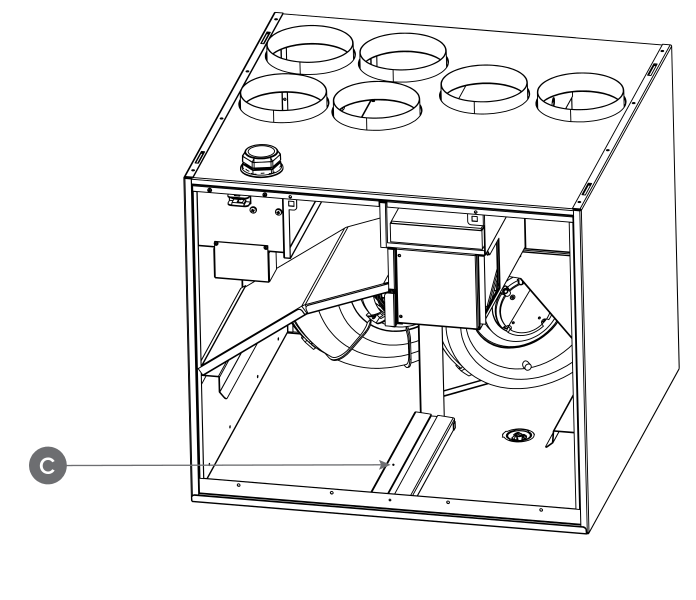
- Lift the HR cell in place.
- Turn the upper support (A) against the cell. Ensure that the upper support is properly nestled against the cell (remains upright).
- Install the extract air filter (B) in place.
- Close the door. Ensure that the safety switch catch of the door is touching the safety switch.
- Plug the ventilation unit back into the mains.