
Viewing the Boost mode information
To view the basic settings of the Boost mode:
- Select Operation menu.
- Click on the Boost mode in the Ventilation modes area to select it.

- Select Activate where required.
- The basic settings of the selected mode will be displayed:
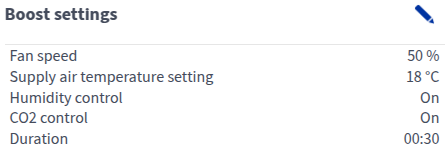
This area shows the following information:
- Fan speed — Shows the fan speed. If the automatic fan speed boost is active, the set value is shown in brackets, followed by the real fan speed.
- Supply air temperature setting — Shows the target supply air temperature set by the user.
- Humidity sensor — Shows whether humidity boost is enabled.>
- Carbon dioxide sensor — Shows whether carbon dioxide boost is enabled.
- Duration — Shows how long the Boost mode will stay active when the timer is used and the Boost mode is activated. The time is set in hours and minutes (hh:mm).
- More information will be displayed in the Information area.
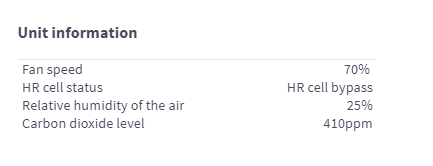
- Fan speed — Shows the fan speed. If the automatic fan speed boost is active, the set value is shown in brackets, followed by the real fan speed.
- HR cell status:
- Heat recovery — Heat from extract air is used to heat the outdoor air flowing in.
- Cold recovery — Extract air cools the incoming outdoor air when it is at least two degrees cooler than the outdoor air.
- HR cell bypass — Outdoor air bypasses the HR cell either partially or completely.
- HR cell defrost — The HR cell is being defrosted.
- Relative humidity of the air — Shows the highest relative humidity value measured by the ventilation unit.
- Carbon dioxide level — Shows the highest carbon dioxide value measured by the ventilation unit.