
Editing the Custom mode settings
To edit the Custom mode settings:
- Select Operation menu.
- Click on the Custom mode in the Ventilation modes area to select it.

The basic settings of the selected mode will be displayed:
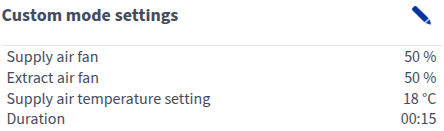
- Select Edit in the right top corner of the area:

The ventilation mode display will open in the editing mode:
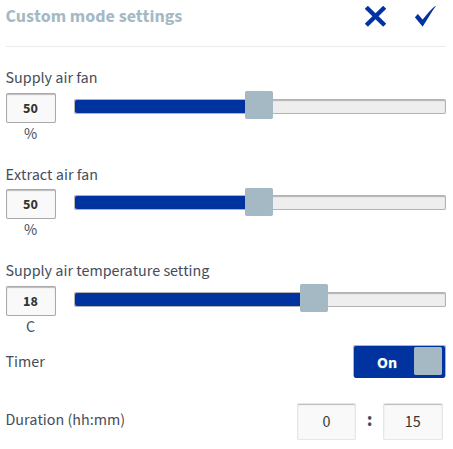
- Set the supply air fan speed value of the Custom mode as a percentage of the maximum by moving the blue Supply air slider. If the slider is moved to the left, the supply air fan speed is reduced. If the slider is moved to the right, the supply air fan speed is increased.NOTE:It is recommended to use a higher supply air fan speed in the Custom mode to create an overpressure in the ventilation zone. Reducing the extract air fan speed is not recommended.
- Set the extract air fan speed value of the Custom mode as a percentage of the maximum by moving the blue Extract air slider. If the slider is moved to the left, the extract air fan speed is reduced. If the slider is moved to the right, the extract air fan speed is increased.
- Turn the mode timer function on or off by using the On/Off button below the Timer text.
- On— When the timer is on, the selected ventilation mode will be used only for the period specified in the timer.
- Off— When the timer is off, the selected ventilation mode will be used until the mode is changed, either manually or automatically by the week clock.
IMPORTANT:If the Custom mode is used to create a momentary overpressure (as a fireplace switch, for example), the timer function may only be turned off if the external fireplace switch has a timer. - Set the Custom mode timer duration by entering the hours and minutes in the time field of the Duration field. The recommended duration is from 15 to 30 minutes.
- Select OK.
 .
.