
Viewing the information of the Custom mode
The Custom mode allows you to view information related to the ventilation unit mode.
- Open Operation menu and select the Custom mode.

- The basic settings of the selected mode will be displayed:
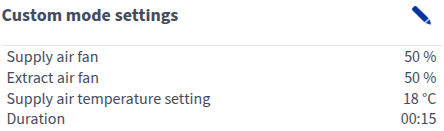
This area shows the following information:
- Supply air fan — Shows the speed of the supply air fan set for the ventilation unit.
- Extract air fan — Shows the speed of the extract air fan set for the ventilation unit.
- Duration — Shows how long the Custom mode will stay active when the timer is used and the Custom mode is activated. The time is set in hours and minutes (hh:mm)
- More information in the Unit information area.
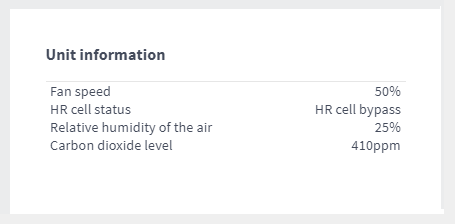
- Fan speed — Shows the actual speed of the supply air fan in the Custom mode.
- HR cell status:
- Heat recovery — Heat from extract air is used to heat the outdoor air flowing in.
- Cold recovery — Extract air cools the incoming outdoor air when it is at least two degrees cooler than the outdoor air.
- HR cell bypass — Outdoor air bypasses the HR cell either partially or completely.
- HR cell defrost — The HR cell is being defrosted.
Relative humidity of the air — Shows the highest relative humidity value measured by the ventilation unit.
Carbon dioxide level — Shows the highest carbon dioxide value measured by the ventilation unit.