
Viewing the information of the At Home mode
The At Home mode allows you to view information related to the ventilation unit mode.
- Open Operation menu.
- Select the At Home mode in the Ventilation modes area.

- The basic settings of the selected mode will be displayed:
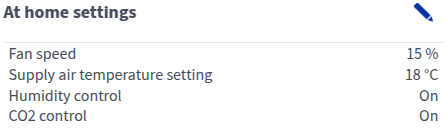
- Fan speed — Shows the fan speed set for the ventilation unit. If automatic boosting (e.g. humidity or carbon dioxide control) is enabled, the actual fan speed may differ from the set value. The actual speed is shown separately under Information.
- Supply air temperature setting — Shows the target supply air temperature set by the user.
- Humidity control — Shows whether humidity boost is enabled.
- CO2 control — Shows whether carbon dioxide boost is enabled.
- More information in the Information area:
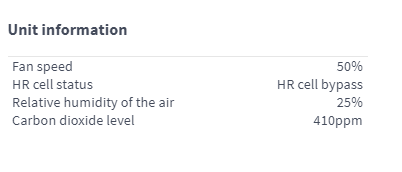
- Fan speed — Shows the actual fan speed of the ventilation unit, which may differ from the set value if automatic boosting is enabled.
- HR cell status:
- Heat recovery — Heat from extract air is used to heat the outdoor air flowing in.
- Cold recovery — Extract air cools the incoming outdoor air when it is at least two degrees cooler than the outdoor air.
- HR cell bypass — Outdoor air bypasses the HR cell either partially or completely.
- HR cell defrost — The HR cell is being defrosted.
Relative humidity of the air — Shows the highest relative humidity value measured by the ventilation unit.
Carbon dioxide level — Shows the highest carbon dioxide value measured by the ventilation unit.